Cultural heritage institutions hold increasingly rich digital collections, including growing numbers of 3D assets. Yet transforming these digital resources into engaging visitor experiences remains challenging. While XR (Extended Reality) technologies offer exciting possibilities for storytelling and audience engagement, developing such experiences often requires specialised expertise, dedicated development teams and significant financial investment.
The EUreka3D-XR project has worked to democratise access to these technologies by developing a suite of five open-source tools that allow cultural heritage professionals to reuse their digital collections, particularly 3D content, to create immersive narratives for visitors, both online and on-site. By promoting an open and accessible approach, the project helps institutions explore XR storytelling while increasing the return on investment of digitisation and fostering collaboration between cultural and technology professionals.
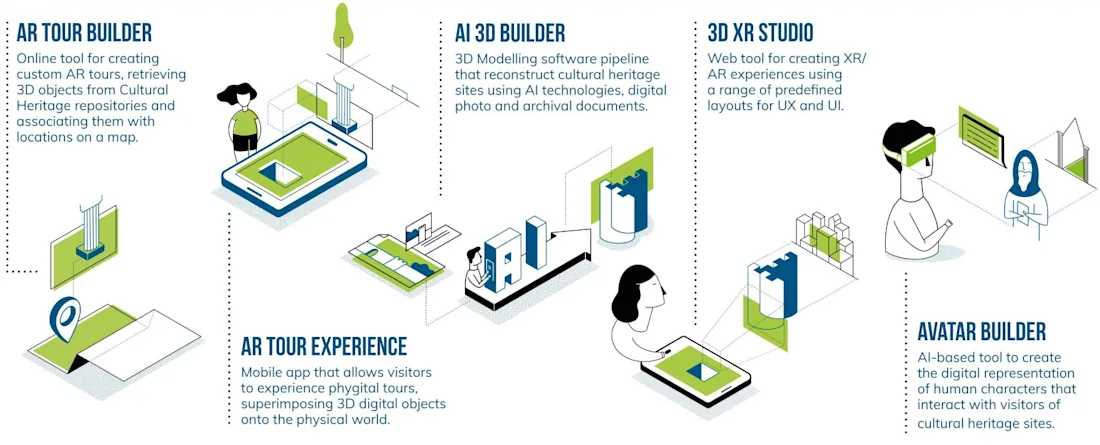
Read on to discover the EUreka3D-XR Toolbox, which offers five tools designed to support cultural heritage institutions in creating and experimenting with XR experiences using their digital collections. Each tool is openly accessible and accompanied by easy-to-understand documentation, manuals and video tutorials.
AR Tour Builder
The AR Tour Builder is a web-based application that enables cultural heritage professionals to design augmented reality tours by linking 3D models and other types of media (such as images, audio, video and text) to specific locations on a map. Curators can define georeferenced points of interest and associate them with digital assets and contextual information, creating engaging narratives that visitors can explore directly on site.
The platform supports the creation of multiple tours for the same location and includes asset management capabilities that allow content to be integrated from sources such as Europeana.eu, the EUreka3D Data Hub or institutional repositories. Tours can be prepared in multiple languages and tested before publication.
Once created, the tours can be accessed through the AR Tour Experience mobile application, which presents the curated content to visitors based on their geolocation. The tool is particularly suited for outdoor heritage environments, where augmented reality overlays and multimedia content can enrich the exploration of cultural sites.
AR Tour Experience
The AR Tour Experience is a mobile application that serves as the visitor interface for tours created with the AR Tour Builder. Designed for on-site exploration, the app allows visitors to browse and select available tours and navigate cultural sites using their mobile device.
Using GPS-based positioning, the application detects when visitors approach predefined points of interest and automatically presents the associated digital content. Visitors can explore 3D models, images, audio, video and textual information directly on their device, either through a dedicated 3D viewer or through augmented reality overlays that place digital reconstructions within the physical environment.
This approach allows visitors to visualise hidden or missing elements of heritage sites, such as reconstructed buildings, archaeological features or artefacts located elsewhere, while moving through the site at their own pace. The application also supports tour progression tracking and pre-downloadable content, making it suitable for environments with limited connectivity. The current implementation is available for Android devices.
AI 3D Builder
The AI 3D Builder supports the creation of 3D models from sets of two-dimensional images. By using AI-assisted reconstruction techniques, the tool automates a process that traditionally requires specialised skills in 3D modelling, texturing and rendering, significantly reducing the time and expertise needed to generate usable 3D assets.
The system analyses collections of images and reconstructs coherent 3D geometry, allowing cultural heritage professionals to transform photographic documentation into complete 3D models. The generated models can be exported in the open GLB format, enabling further editing or integration into other applications such as XR experiences, 3D viewers or digital exhibitions.
This approach is particularly useful for institutions that hold extensive photographic archives but lack the resources or expertise to produce 3D content. For example, a city archive documenting a lost building could upload historical photographs and contemporary images of the site to generate a first 3D reconstruction, which can then be refined and reused in research, interpretation or visitor experiences.
3D XR Studio
The 3D XR Studio is a web-based authoring tool that allows cultural heritage professionals to create immersive XR and AR experiences without requiring programming skills. Through an intuitive interface, users can combine 3D models with images, videos, audio and text to build interactive scenes and narrative paths that visitors can explore through mobile devices or XR headsets.
Unlike the AR Tour Builder, which relies on GPS-based navigation, XR Studio experiences can operate without continuous internet connectivity or GPS once downloaded. Curators can design routes, place digital content within real-world locations and fine-tune the positioning of 3D models directly on-site.
Experiences are typically launched using physical reference points, such as totems with instructions or QR codes placed at a site. Visitors can scan the code to download the experience to their device and then explore the curated content while moving through the location, discovering 3D reconstructions, multimedia material and contextual information prepared by the curator.
For example, a city archive could create an AR experience that allows visitors to follow the historical route of vanished city walls and fortifications. By combining reconstructed 3D models with historical images and audio narration, the XR Studio enables visitors to rediscover lost urban heritage directly within the contemporary city landscape.
Avatar Builder
The Avatar Builder supports the creation of virtual human characters that can act as guides, storytellers or mediators in cultural heritage experiences. By embodying historical or fictional personas, avatars can help visitors connect more directly with cultural content, offering new ways to interpret collections and communicate historical narratives.
Creating expressive and technically compatible avatars normally requires specialised skills in 3D modelling, animation and software integration. The Avatar Builder addresses this challenge by providing a structured production framework that guides users through the process of designing, animating and preparing avatars for different visualisation platforms. By relying on accessible open-source tools, the approach enables cultural heritage professionals to create and deploy virtual characters without requiring advanced technical expertise.
The resulting avatars can be integrated into immersive XR environments or published as animated 3D models for web-based viewers, allowing institutions to reuse them across multiple digital experiences.
For example, a heritage site could recreate a historical figure associated with the location and use the avatar to narrate the site’s history. Based on historical sources, curators can design the character’s appearance and record narration that brings the story to life. The animated character can then be integrated into immersive XR experiences, used in on-site installations or published online as an interactive guide for remote visitors.
Find out more
Together, these five tools form the EUreka3D-XR Toolbox, enabling cultural heritage institutions to experiment with new forms of XR storytelling while reusing their digital collections. By lowering technical barriers and promoting accessible workflows, the toolbox supports institutions in exploring immersive technologies and developing new ways to engage audiences with cultural heritage.
Discover more about the EUreka3D-XR tools and learn how they were used to produce three demonstration scenarios within the EUreka3D-XR project. Use the QR code below to go to the toolbox!